
Caption Text
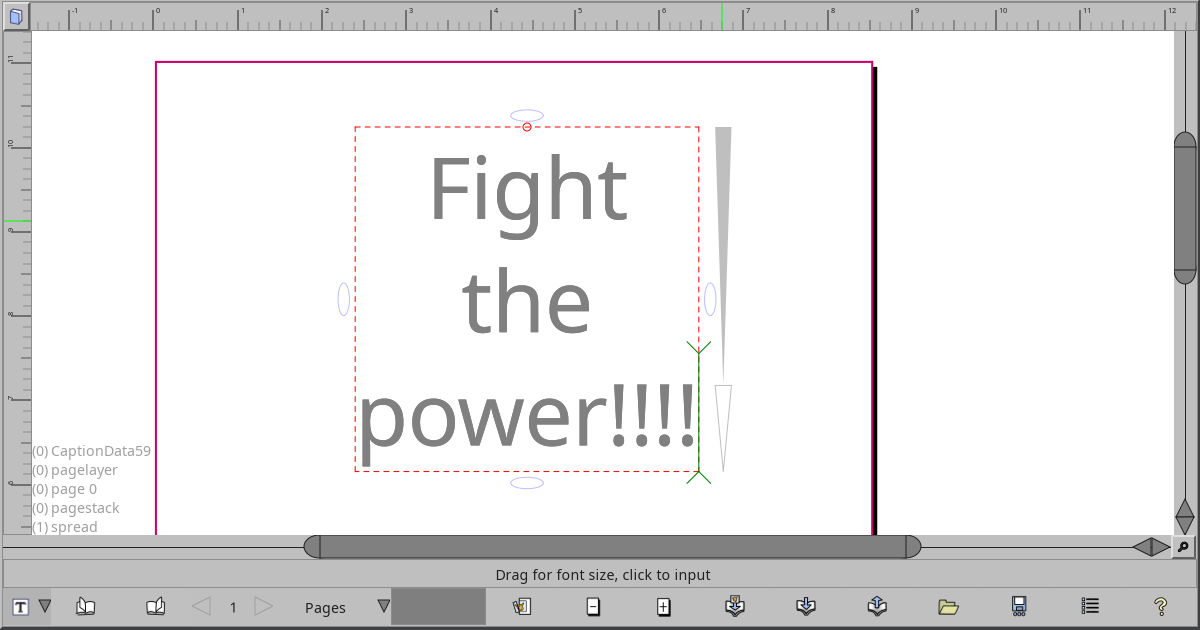
This tool lets you add simple text, made of one font style.
I have formatted text in my todo list, but it’s been there for many
years, so text for now is either this, or text on a path.
Caption objects let you display multiple lines of text, and easily adjust line spacing, font type, color, and centering.
- Font size is changed just by dragging the upper triangle on the right
- Line spacing has a triangle adjuster under the font size adjuster
- Centering is done by dragging the oval knob along the middle just outside the bounding box. If you hold shift while dragging, you can center beyond just Left/Center/Right, and Top/Center/Bottom.
- Color is changed in the usual way, by dragging on the viewport’s color box along the bottom of the window.
- Font is changed by double clicking in the text, and the font selection dialog pops up. I’m a little embarrased by the current state of the font selection dialog, so I’m not showing it here.
- Obscure trick: if you want accents on your vowels but your input method
doesn’t let you, then write, for instance,
e', then press control-J (for join), and you end up with é. - You may also press
Control-ito bring up the Character Inserter, to select from any of the characters defined in the font.
